Your Notes,
Finally Organized Your Way.
Staying organized shouldn't be a nightmare. Zenote is a cute, super-light Markdown notes app built around one idea: total freedom to organize notes your way. Carried by our mascot, the Blue Lemur, it's 100% private by default — no cloud sync, no tracking — and ready to work alongside your favorite AI assistant whenever you want it to.
Staying organized
shouldn't be this hard.
Whether you're a software engineer, a solo founder, a manager, or just someone who loves taking notes — finding a tool that fits your way of thinking is always a struggle. Zenote's answer is simple: give you total freedom to organize notes however makes sense to you, not however an app forces you to.
Markdown, done right
Markdown has quietly become the standard for notes — and the AI boom only made it more essential, since it's the format language models read and write best. Zenote is built around it from the ground up.
Privacy first, always
No forced cloud sync. No tracking. No accounts. Your notes live in plain folders on your own machine, under your control, from day one.
A real CLI, not an afterthought
Zenote is just as much a command-line notes tool as it is a desktop app. Script it, automate it, and wire it into your existing workflows — great for developers who live in the terminal.
MCP-ready for your LLM
Zenote speaks the Model Context Protocol natively, so your favorite AI assistant can read and work with your notes directly — securely, and always under your control.
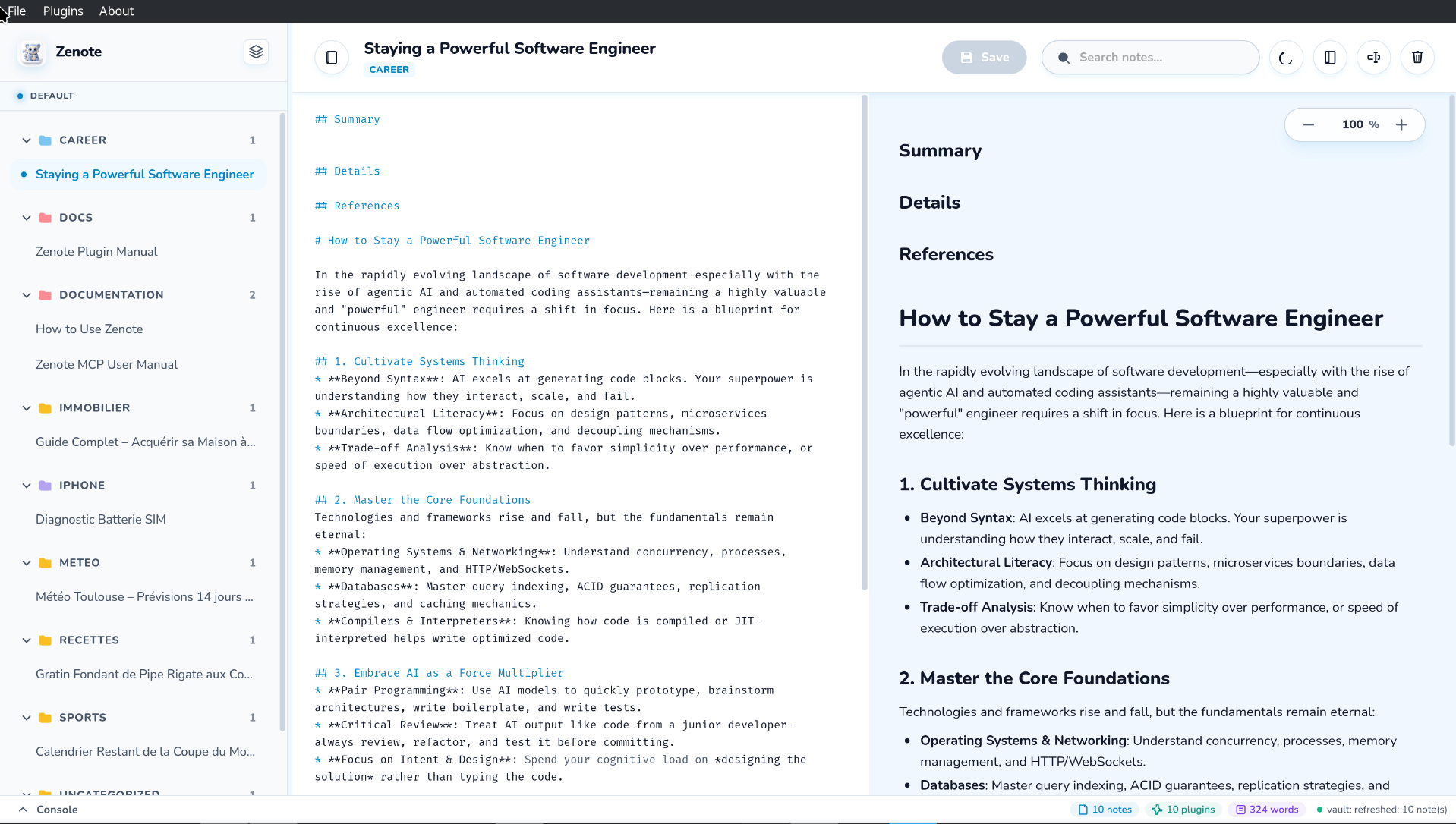
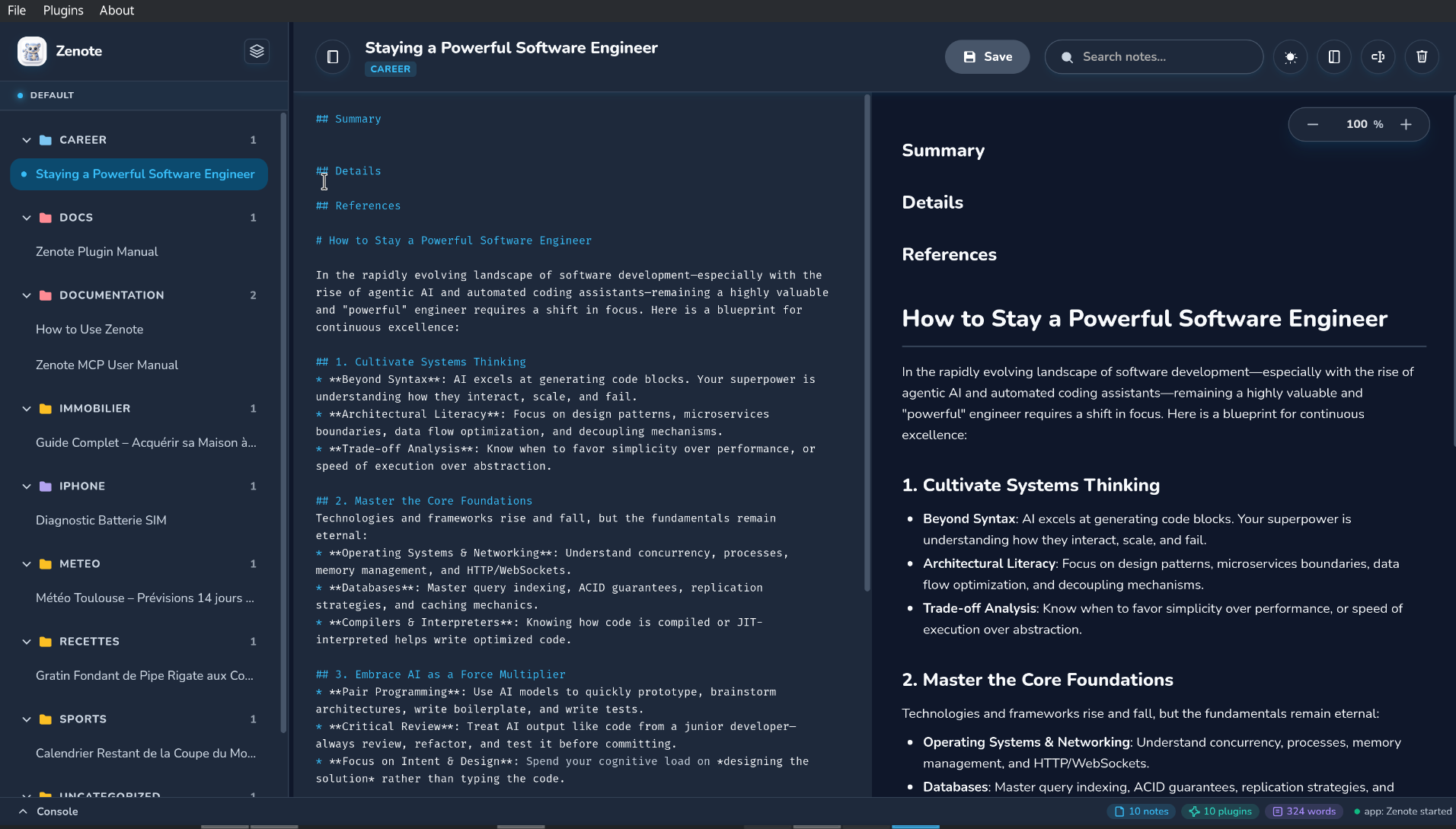
See it in Action
A real look at Zenote's interface, in both light and dark mode.
Everything You'll Love About Zenote
Simple, fast, and made for everyday note-taking.
Vault
Everything is saved directly on your machine, in plain folders you can see and back up. No forced cloud, no subscriptions — your notes stay entirely yours.
Workspaces
Split your vault into separate spaces for separate parts of your life — Personal, Work, a side project. Switch between them in one click, and search reaches across all of them at once so nothing gets lost.
Categories
Inside each workspace, notes are grouped into color-coded folders you name yourself. Collapse what you're not using and keep your sidebar tidy, no matter how many notes pile up.
Notes
Every note is a plain markdown file with live preview, tags, and checklists. Drag and drop existing .md files straight in, or start typing and watch it render as you go.
Clipboard
Copy a picture or take a screenshot, then just paste it into your note. Zenote tidies it away for you automatically — no manual saving needed.
Plugins
Turn on ready-made plugins with a single click, or build your own in any programming language you like — Python, Node, Bash, Rust, whatever you're comfortable with. No restrictions.
Search Engine
Search across every workspace in an instant, with results grouped so you always know where a note lives. Clean text previews — no stray markdown symbols — make it easy to spot the right match at a glance.
Connect MCP
Securely connect Zenote to AI assistants like Claude. Ask it to find, summarize, or write notes for you — always with your permission.
Native Performance
Zenote opens instantly and barely uses any of your computer's resources. A cute, quick tool you'll actually enjoy using every day.
Graph View
See how your notes connect. Wikilinks between notes are resolved automatically and drawn as an interactive graph, so you can navigate your knowledge visually instead of digging through folders.
Calendar View
Browse notes by the date they were created or edited, with category-colored chips at a glance. A built-in way to look back at what you wrote and when.
Favorites Bar
Pin the notes you use most to a dedicated favorites bar for one-click access. Zenote even tracks usage to automatically keep the bar full of what matters most.
Serve Your Vault
Spin up a local web server straight from the CLI to browse and read your notes from any browser on your network — perfect for checking a note from your phone.
Let Your Notes Talk
To Your AI Assistant.
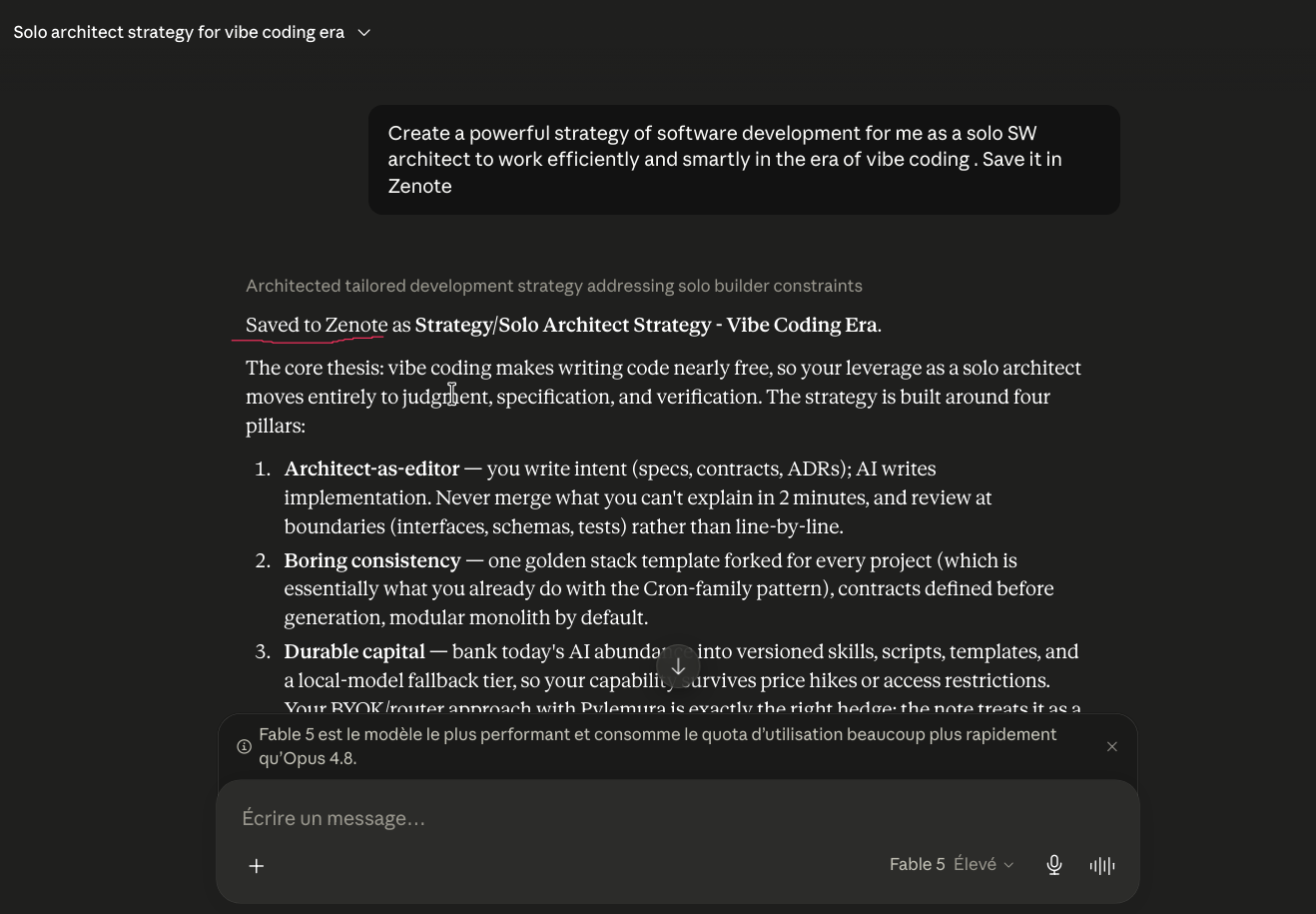
Zenote speaks the Model Context Protocol (MCP) — the open standard that lets AI assistants like Claude connect directly to the apps you already use. No copy-pasting notes into a chat window, no exporting files by hand. Turn it on in Settings, and your assistant plugs straight into your vault.
Once connected over MCP, your assistant can:
- 🌟 Browse your notes to understand what you've written.
- 🌟 Find things instantly using natural questions.
- 🌟 Write or update notes for you, only when you allow it.
You stay in control — MCP write access is always off by default and can be switched on in Settings.
How to configure MCP
-
1
Start Zenote's built-in MCP server from a terminal. Use
--read-writeonly if you want your assistant to be able to create or edit notes, not just read them.
# Read-only (browse & search notes)
./build/zenote mcp

# Read-write (also create, edit & delete notes)
./build/zenote mcp --read-write-
2
Point your AI assistant at it. For Claude Desktop and most MCP clients, add this to your
mcp_config.json(e.g.~/.config/Claude/claude_desktop_config.json):
{
  "mcpServers": {
    "zenote": {
      "command": "/path/to/zenote",
      "args": ["mcp", "--read-write"]
    }
  }
}
Restart your assistant after saving the config. It will then have access to list_notes, read_note, search_notes, and — in read-write mode — write_note / delete_note.
A Full CLI,
Not an Afterthought.
Every action available in the app is also a command. List, read, write, search, and manage workspaces straight from your shell — perfect for scripts, dotfiles, and automations.
-
🌟
Full CRUD on notes —
list,show,new,edit,delete. - 🌟 Search from the shell with the same query syntax as the app, scoped or across every workspace.
- 🌟 Manage workspaces — create, rename, delete, and switch — without opening the app.
- 🌟 JSON output on every read command, so it's trivial to pipe into other tools.
zenote search "rust" --json
zenote workspace new "Client Work"
zenote import notes/*.md --workspace "Client Work"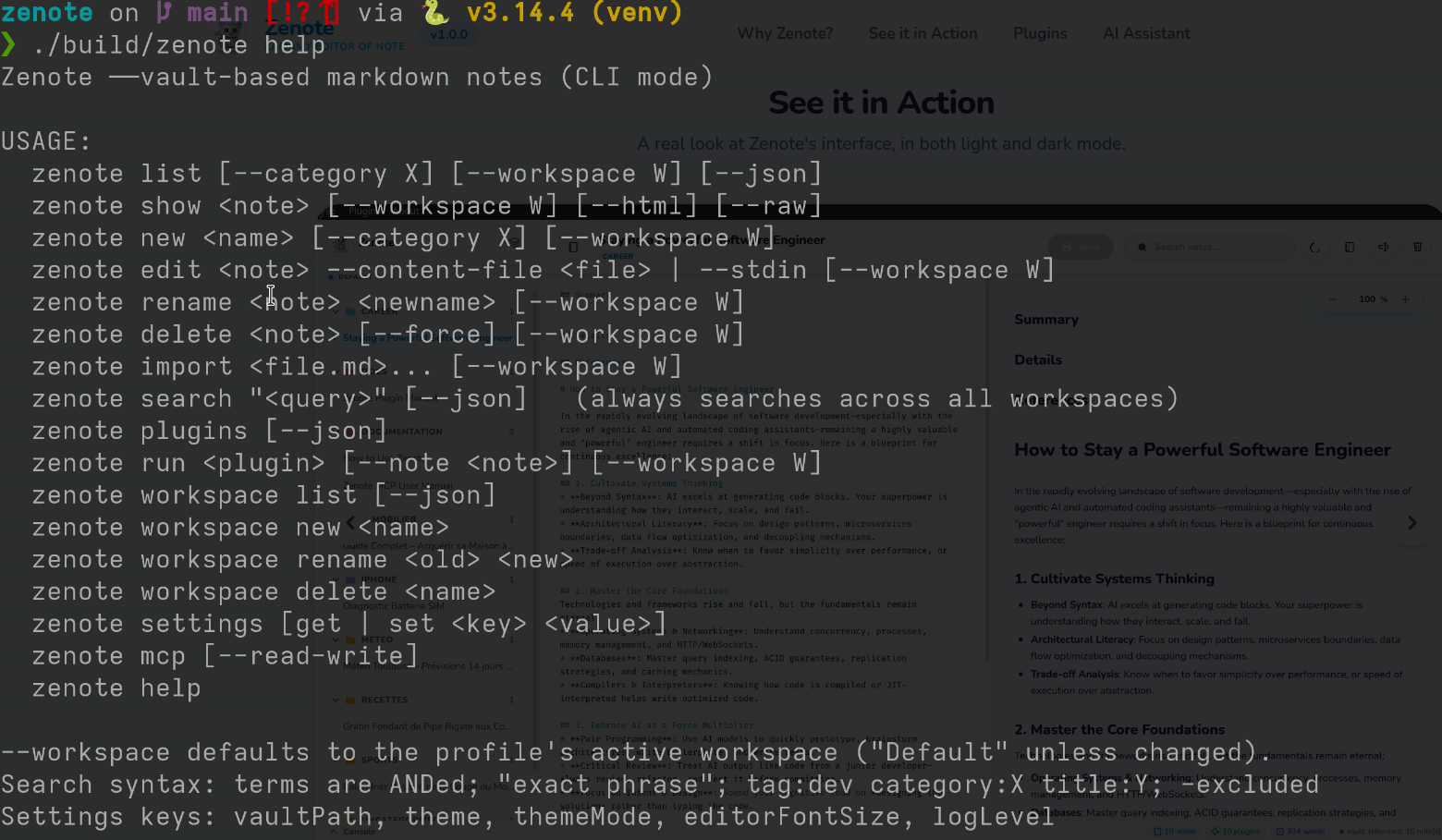
VaultStats
Full dashboard: notes, words, categories, most-active day
OrphanFinder
Finds unlinked notes and unused attachment images
DailyDigest
Rolls up everything you wrote today into one note
LinkChecker
Scans notes for dead or redirected external links
Markdown Repair
Fixes formatting issues like unclosed code blocks, headers/lists
WordCount
Counts words, lines, paragraphs, and characters in notes
TagCloud
Generates a tag frequency cloud for all notes in the vault
TemplateInserter
Inserts custom note templates (Daily, Meeting, Project)
ExportHTML
Converts and exports notes to standalone styled HTML files
GitSync
Commits and pushes your vault to a Git remote
VaultBackup
Zips your vault and keeps the last 7 backups
Give your notes
a few extra super-powers.
Zenote ships with 11 ready-to-use plugins covering the essentials: VaultStats for a full dashboard of your vault, OrphanFinder and LinkChecker to keep your notes well-connected, DailyDigest and TemplateInserter to speed up daily writing, and GitSync / VaultBackup to keep everything safe. Turn one on, pick a note if it needs one, and let it run.
Every plugin is just a shell script — no proprietary SDK, no build step. Write your own in Bash, Python, Node, or Rust, drop it in your vault's _plugins/ folder, and it shows up in the menu automatically.
How to write your own plugin
A plugin is a folder with a plugin.json manifest and an executable entrypoint. Zenote runs the entrypoint and passes the vault path — and the active note's path, if one is open — as arguments.
_plugins/word-count/plugin.json
{
  "name": "WordCount",
  "description": "Counts words, lines,
    paragraphs, and characters
    in the current note.",
  "version": "1.0.0",
  "entrypoint": "run.sh",
  "args": ["{vault}", "{note}"]
}
_plugins/word-count/run.sh
#!/usr/bin/env bash
set -euo pipefail

VAULT="$1"
NOTE="$2"

words=$(wc -w < "$NOTE")
echo "📄 $words words in $(basename "$NOTE")"
That's the whole contract: {vault} and {note} get substituted with real paths, your script writes to stdout, and its output shows up right in Zenote's console. Run it from the app, or from the CLI with zenote run <plugin>.

Download Zenote ⭐️
Get Zenote for free. No account, no sign-up, no subscription — just download, install, and start writing. 100% offline and secure.